PortPro alternative
A sourced, row-by-row comparison with a check date.

Compare
Spreadsheets are free and flexible, and for a few trucks they can be enough. This page is about the point where they start costing you money, and how to move off them safely.
A spreadsheet is familiar, it costs nothing, and you can shape it to your own business in an afternoon. For a very small operation with one dispatcher and a handful of loads a week, a good sheet plus a phone is a reasonable system. If that is you, you may not need to change anything yet.
The trouble starts as the number of moving parts grows. The sheet holds what you typed, not what has happened, and it cannot tell you that a last free day is tomorrow unless someone remembers to look.


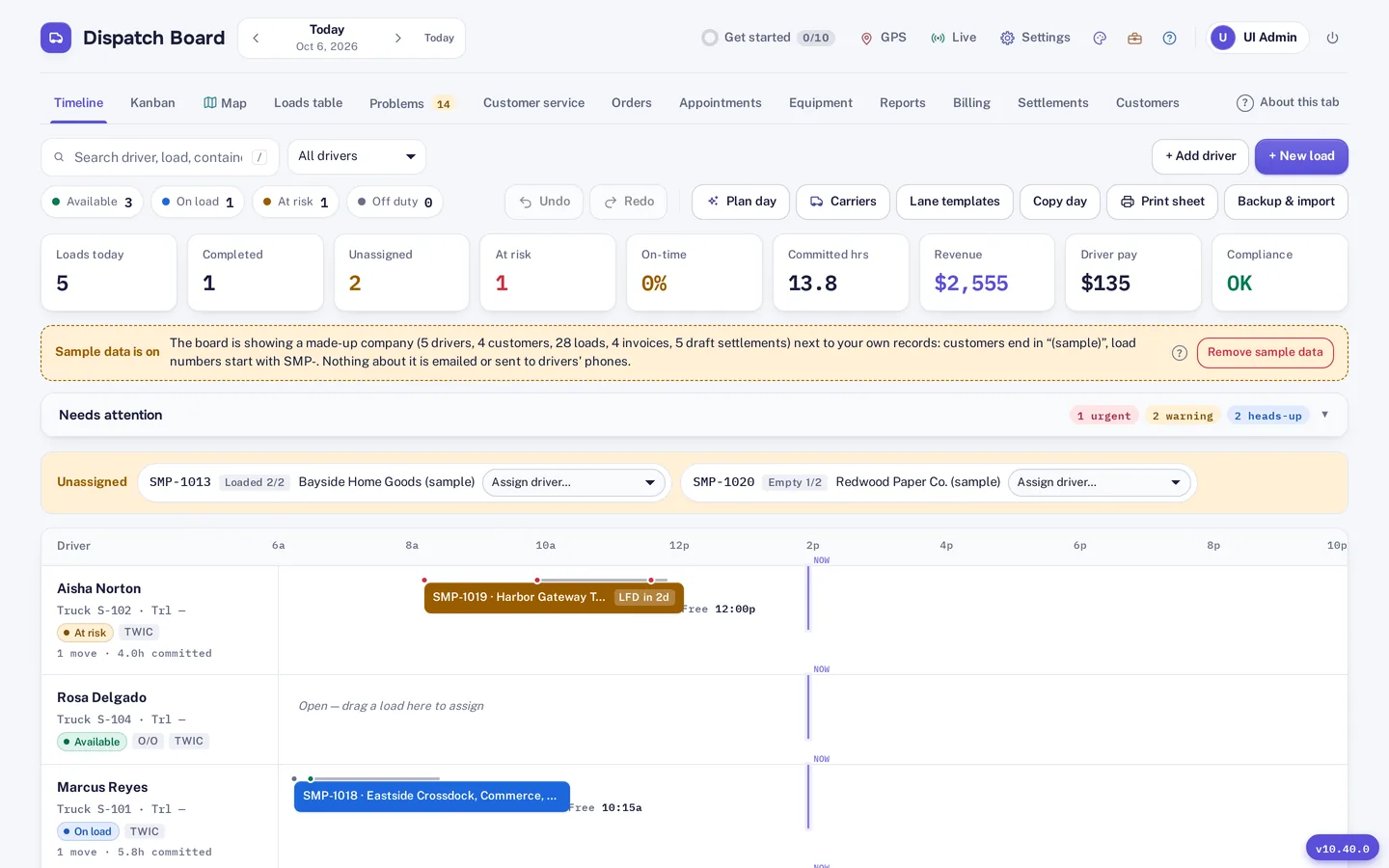
On the board, each driver is a lane on a timeline, loads can be dragged onto a truck or driver with undo, and the same loads appear as Kanban columns and on a live map. Plan day drafts the whole day, explains each pick and shows the empty miles and late minutes saved. Limits such as licences, TWIC, 11 hours driving and 14 on duty are applied for you.
Drivers see their moves in the driver app instead of a text message. Photos, signed PODs and PDFs are saved on the phone and uploaded when signal returns, and dispatch can chat on each load.
You do not have to switch in a day. Import drivers, trucks, chassis, customers, rate tables and loads from Excel, CSV or a PDF rate sheet. The importer matches columns by heading, checks every row before saving and flags duplicates. Dispatch Board has a bulk import for loads, so your existing sheet can become a week of moves.
Run both systems side by side for part of the 14-day free trial. The trial needs no card. If you leave, a full backup file and a CSV of your loads can be downloaded, so your records are not locked in.
Lite is $149 a month in Canadian dollars and includes 5 trucks, with extra trucks at $15 each up to 15, unlimited dispatcher logins and free driver logins. Whether that is worth it depends on what the sheet misses. The cheapest way to find out is to upload one recent chassis invoice and look at per diem on a real week of loads. Container tracking is on the Fully loaded plan, so check the pricing page for the features you need.
Dispatch Board is not a blank grid. Your own columns, formulas and one-off reports are more flexible in a spreadsheet, though custom and scheduled reports and a Google Sheets sync are available. Dispatch Board does not book terminal appointments, has no EDI and does not sync with QuickBooks Desktop. If you are weighing it against another system, see the PortPro comparison.
Self sign-up gives you a company with sample data and a get-started checklist, so you can look around before you enter anything of your own. Then bring in your real freight: import drivers, trucks, chassis, customers, rate tables and loads from Excel, CSV or a PDF rate sheet. The importer matches columns by heading, checks every row before saving and flags duplicates.
Add your terminals and their gate hours, invite your drivers to the driver app, and run a real week alongside your current system. The Help Center has a guide for every screen. A bar at the top of the board shows the days left in the 14-day trial, and the account owner gets an email two days before it ends. Plans are month to month, and you can download a backup file and a CSV of your loads at any time.
Questions
Yes. A Google Sheets sync is available, and you can export CSV files at any time.
It depends on the state of your data. The importer checks every row before saving, so you can fix problems before anything is committed.
Lite includes 5 trucks at $149 a month. A sheet may still be enough if per diem and chassis bills are not costing you; the trial will show you.
No. You can download a backup file and a CSV of your loads before you leave.
No. Dispatchers use a browser, and drivers use the web app on their phones.
A sourced, row-by-row comparison with a check date.
Owner-run fleets of a few trucks leaving spreadsheets behind.
Priced by the truck, with unlimited dispatcher logins.
Every company gets 14 days free with no card. Import a week of your own freight and judge it yourself.