Step 1
Availability and last free day
Terminal49 tracking fills them in for your containers, so the dates on the board are not typed in by hand.
Container tracking
Container availability and last free day through Terminal49, vessel arrival alerts from AIS, and the restrictions and closures that change your plan.
Overview
In drayage, the dates move the money. Miss the last free day and per diem starts. Send a truck before the container is available and the driver waits at the gate. Arrive after a terminal closure and the move slips a day. Each of those costs real money, and each can usually be seen coming if the dates are in front of you.
Dispatch Board puts those dates on the board. Container tracking through Terminal49 fills in availability and last free day. Vessel arrival alerts come from AIS. Empty return restrictions, appointment rules and port closures are kept by place and date. Tracking is part of the Fully loaded plan, and you can see how it works on your own containers in the trial.
Container Status
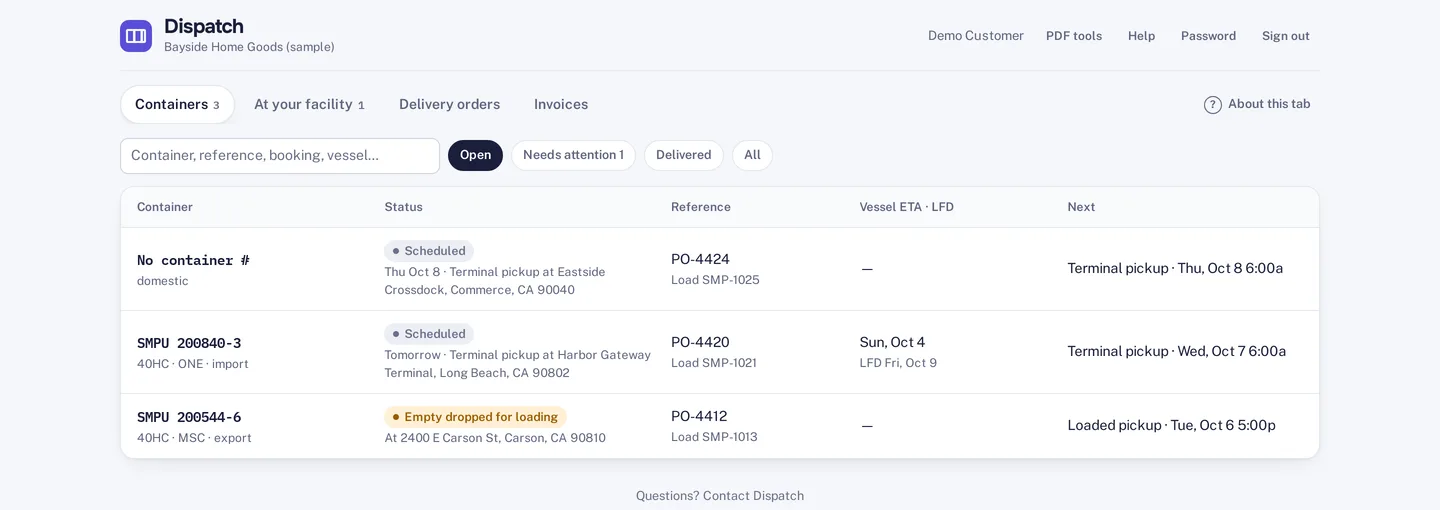
Container tracking through Terminal49 provides availability and last free day for your containers. The last free day is the date after which the shipping line starts charging per diem, so it is the date dispatchers watch. The Problems tab on the dispatch board lists last free days alongside holds and late moves, and hold alerts show before a driver is sent.
A week grid built for customer service shows vessels, last free days, pickups, deliveries and returns for each of the next seven days. Container numbers are checked for a valid check digit at intake and in the API, which catches a mistyped number before it becomes a lookup that finds nothing.

Ship Timing
Vessel arrival alerts use AIS data from five providers: VesselFinder, MarineTraffic, Datalastic, AISHub and AIS Stream. Two of them are free to use. Vessel tracking runs on your own provider key, so you choose the provider and the cost.
On each load you can see how far off the ship still is and when it is due. The customer portal shows vessel ETA next to the last free day and the next step, so customers see the same dates your dispatchers do. More on that in customer portal.

Return Rules
Empty return restrictions are kept by place, line, size and dates, along with the alternative return place. Loads affected by a restriction show Return closed and where to send the empty instead. Dual transaction suggestions skip an empty the place will not take that day. Port closures are recorded by terminal and date, and appointment rules and slot capacity can be set, with booking links for your own team or customers.
The yard list covers containers sitting in your own yard: days on the ground, a spot, the per diem clock and the next move. Each of those fields is something a dispatcher otherwise keeps on a whiteboard. Per diem on those boxes is then handled as described in per diem and detention.

How it works
Step 1
Terminal49 tracking fills them in for your containers, so the dates on the board are not typed in by hand.
Step 2
With your AIS provider key added, the load shows how far off the ship is and when it is due.
Step 3
Return closed appears on affected loads with the alternative return place, and plan day avoids a shut gate.
Step 4
The yard list shows days on the ground, spot, per diem clock and next move for boxes you are holding.
Not included: automatic appointment booking in terminal systems such as eModal. You can set appointment rules and slot capacity and use booking links.
Questions
The last free day is the final day a container can sit without the shipping line charging per diem. After it, a daily charge starts, which is why dispatchers plan pickups around it.
From AIS providers you connect with your own key: VesselFinder, MarineTraffic, Datalastic, AISHub or AIS Stream. Two of the five are free to use. Dispatch Board does not publish an accuracy figure for ETAs.
Affected loads show Return closed and the alternative return place. The restrictions themselves are kept by place, line, size and dates.
No. Dispatch Board is hosted, so dispatchers use a browser and drivers use the web app on their phones.
No. It does not book appointments in terminal systems such as eModal. You can set appointment rules and slot capacity and use booking links.
Start a trial and add a week of real containers.