
Small drayage carriers
Owner-run fleets of a few trucks leaving spreadsheets behind.

Solutions
Dispatch Board is priced by the truck and used differently by a three-truck owner, a forty-truck fleet, an owner-operator and a broker. Pick the page that matches your company.
Start with who does the dispatching and how many trucks you run. If the owner dispatches and the business is under fifteen trucks, read the small carriers page. If you have several dispatchers, mixed driver types and customers calling for updates, read growing fleets. If you drive your own truck, read the owner-operators page, which is honest about where the price may not suit one truck. If you sell moves and hand them to partner carriers, read brokers and IMCs.
Some companies fit more than one. A fleet that also brokers overflow loads will want the growing fleets and brokers pages together.


Pricing is per truck, in Canadian dollars, month to month. Lite is $149 and includes 5 trucks; Medium is $349 and includes 15, adding driver settlements, the customer portal, reports and appointments; Fully loaded is $699 and includes 30, adding container tracking, the AI assistant, the orders inbox, the public API and brokerage. Extra trucks cost $15, $12 and $10 each on the three plans. Every company gets a 14-day free trial with no card needed, and the pricing page lists everything.
Dispatch Board does not book terminal appointments automatically, has no EDI, and does not sync with QuickBooks Desktop. The assistant answers questions rather than taking actions, and there are no predicted-ETA alerts to customers. We say this on every page so you can decide quickly. The PortPro comparison goes through the differences in more detail.
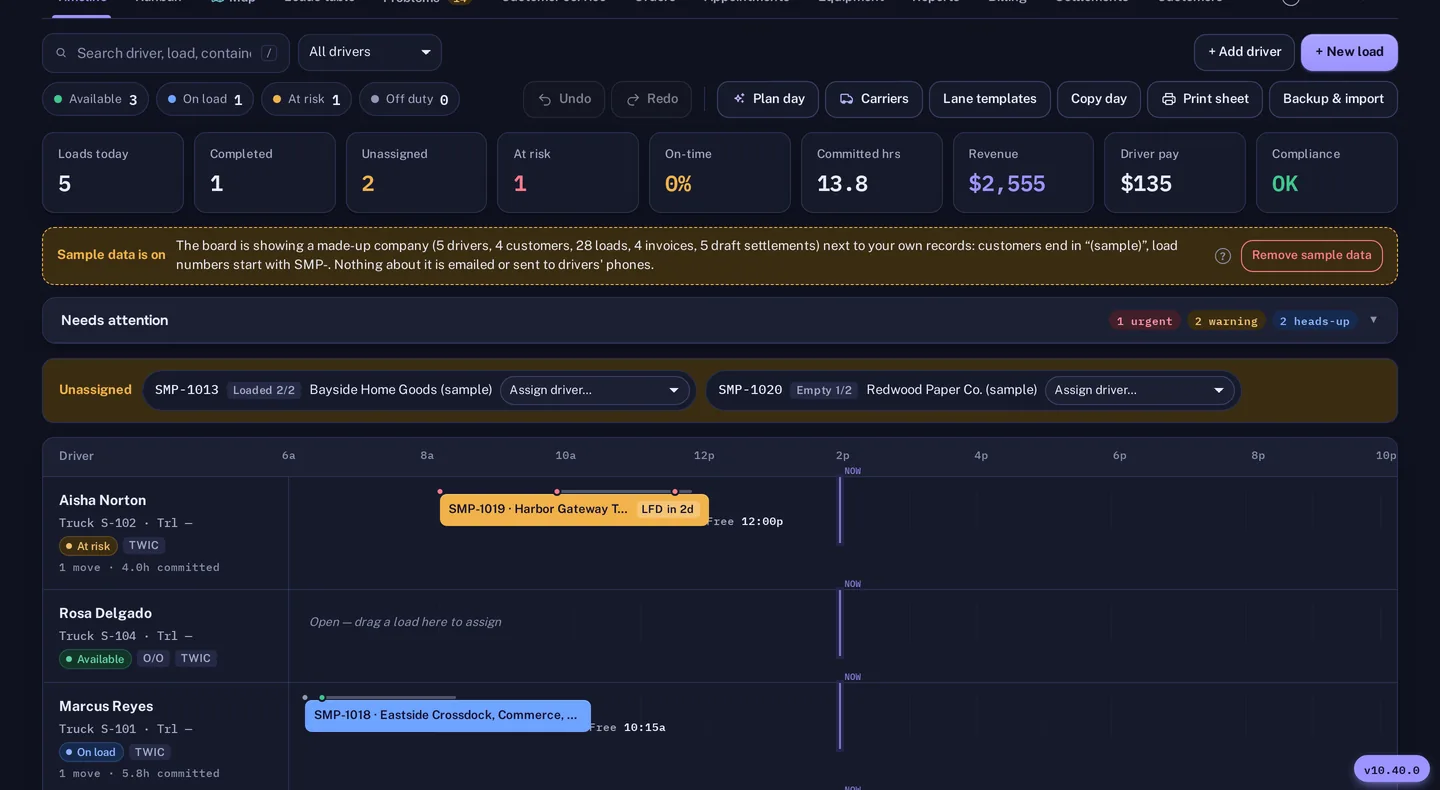
Take a week of real moves and put them in the trial. Import drivers, trucks, customers and loads from Excel, CSV or a PDF rate sheet, run Plan day, and upload one chassis invoice. Whichever page you started on, that exercise tells you more than any description.
A small carrier usually says the owner dispatches, drives some days and does the invoices at night. The small carriers page is written for that person and covers the Lite plan, the import from a spreadsheet, and per diem recovery. A growing fleet usually says it has outgrown the owner's head: several dispatchers, owner-operators and partner carriers on the same freight, and customers who phone for updates. That page covers Plan day, portals and settlements.
An owner-operator usually says "I just need to get paid and prove my wait." The owner-operators page covers the driver app, settlements and waiting-time proof from either side of the relationship. A broker usually says "I sell the move and a partner hauls it." The brokers page covers the carrier portal, tracking links and profit per load. Each page ends with a list of what Dispatch Board does not do, because the quickest way to waste a trial is to find a missing feature on day thirteen.
Owner-run fleets of a few trucks leaving spreadsheets behind.

Several dispatchers, mixed drivers and customers who want to look things up.

The driver app, settlements and waiting-time proof for one-truck operators.

Carrier portal, tracking links and billing both ways.
Self sign-up gives you a company with sample data and a get-started checklist, so you can look around before you enter anything of your own. Then bring in your real freight: import drivers, trucks, chassis, customers, rate tables and loads from Excel, CSV or a PDF rate sheet. The importer matches columns by heading, checks every row before saving and flags duplicates.
Add your terminals and their gate hours, invite your drivers to the driver app, and run a real week alongside your current system. The Help Center has a guide for every screen. A bar at the top of the board shows the days left in the 14-day trial, and the account owner gets an email two days before it ends. Plans are month to month, and you can download a backup file and a CSV of your loads at any time.
Questions
Plans are month to month, and extra trucks can be added one at a time. See the pricing page for plan details.
No. Dispatcher and admin logins are unlimited on every plan.
Not if you import your own data. Guided onboarding is free with an annual plan and $999 one time on a monthly plan.
Port pages are under drayage by port.
Yes. Each company has its own database, files and logins.
Priced by the truck, with unlimited dispatcher logins.
Vancouver, Prince Rupert, Seattle, Los Angeles, Montreal and Toronto.
A sourced, row-by-row comparison with a check date.
Every company gets 14 days free with no card. Import a week of your own freight and judge it yourself.